Noxogy Sleep Tracker & Snore
Apirox, s.r.o.Medical
4.5142.00 Reviews
- Version
- 1.2.45
- Installs
- 500.00K
- Age Rating
- Teen
Screenshots
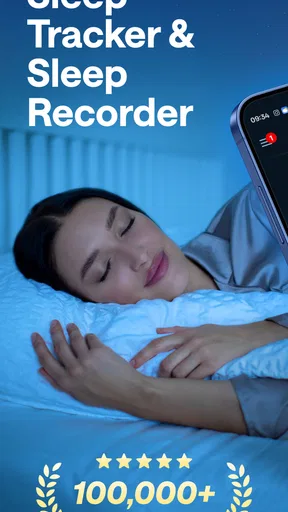
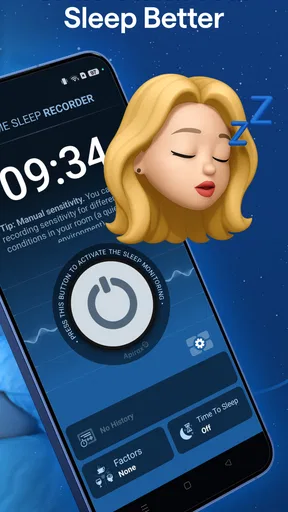
Our Review of Noxogy Sleep Tracker & Snore
 Analysis by Appyee
I see Sleep Tracker & Sleep Recorder as a useful starting point for noticing what happens overnight, especially if you’re curious about snoring or nighttime sounds. Its appeal is the mix of sleep tracking and audio playback: you can look for patterns, then hear some of the moments behind them. That makes it more engaging than a simple bedtime log, though I’d treat what it shows as a prompt for reflection, not a medical assessment.
What overnight recordings can tell you
The most practical value may come from reviewing recordings with a question in mind. If you wake feeling tired, for example, you can check whether the night included repeated stretches of snoring or other sounds. One recording is only a snapshot, so I’d look for a recurring pattern across several nights rather than drawing a conclusion from one unusual clip.
There’s also a useful distinction between listening for entertainment and listening for a reason. A funny sleep-talk moment can be a welcome novelty, but the audio is more helpful when you use it to compare nights: perhaps you slept in a different room, went to bed later, or felt more rested the next morning. Keep notes alongside what you hear if you want to make those comparisons meaningful; the recording alone can’t explain why a sound occurred.
A sensible routine for getting value
For a clearer personal picture, I’d keep the phone in the same place each night and try to follow a fairly consistent bedtime routine. That doesn’t make the results clinical, but it reduces the number of everyday changes you’re comparing at once. After waking, take a quick look at the night’s summary, listen only to clips that seem relevant, and note how rested you feel before the details fade.
This routine also helps prevent over-checking. Sleep naturally varies, and a single restless night is not necessarily a problem to solve. I’d use the app to spot broad trends over time rather than treating every graph or sound as a verdict on the quality of a night. If the information makes you anxious or encourages you to monitor sleep obsessively, stepping back may be more beneficial than collecting more data.
Setting Up the Sleep Haven
First things first, getting started with Sleep Tracker & Sleep Recorder is a breeze. You download the app, and it greets you with a clean, intuitive interface. It’s like slipping into a freshly made bed—super inviting. You’ll need to grant it access to your microphone and health data to get the full experience. Trust me, it’s worth it. The setup process is straightforward, and the app walks you through each step, ensuring you’re not left fumbling around in the dark.
Understanding Your Sleep Patterns
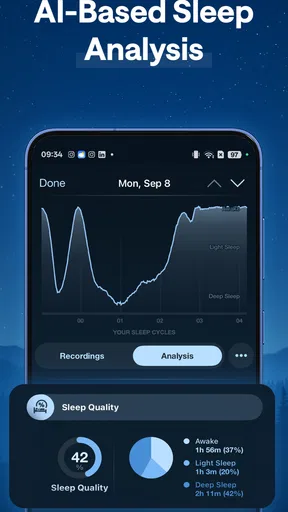
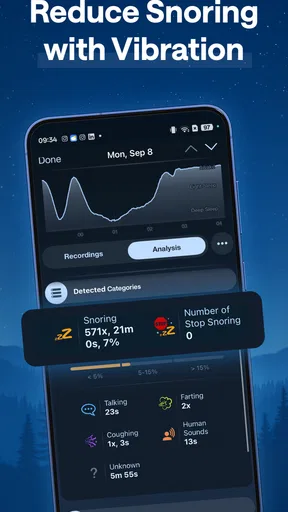
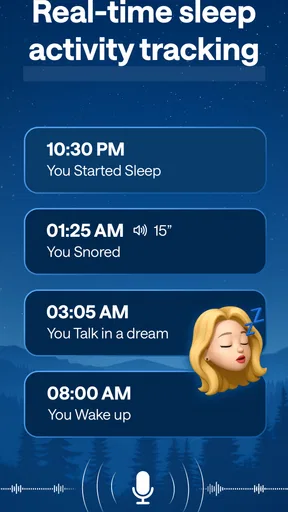
Once you’re tucked in, the app goes to work. It uses your phone’s sensors to monitor your sleep cycles, from light sleep to that deep, blissful slumber. It even tracks your REM stages, which are crucial for dreamers like us. The next morning, you get a detailed breakdown of how you slept. It’s like having a personal sleep coach nudging you towards better rest. The insights are presented in colorful graphs, making it easy to see patterns and trends over time.
Reading the results with care
Those charts are easiest to use as a record of your own nights, not as a precise measurement of what your brain or body did in every sleep stage. Phone-based tracking can offer a convenient overview, but it isn’t the same as a clinical sleep study. I’d focus on broad changes in routine and how you feel during the day, rather than trying to diagnose a sleep condition from a graph.
If a recurring concern is affecting your health or daily life, the app can help you describe what you’ve noticed, but it shouldn’t replace a conversation with a qualified health professional. A repeated recording may be worth mentioning; it is not proof of a diagnosis. This distinction matters most for anyone hoping the app will explain persistent exhaustion, breathing problems, or another serious symptom on its own.
The Joy of Recordings
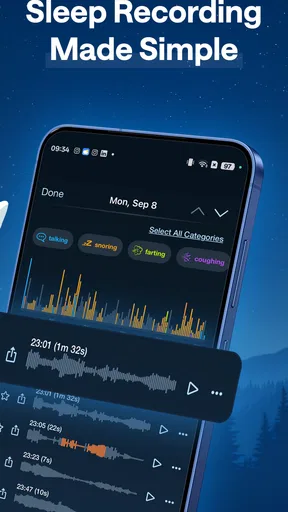
Now, here’s where things get interesting. The sleep recorder feature captures those late-night mumblings or potential snore symphonies. Ever caught yourself talking in your sleep? This feature is like a late-night talk show replay. You can listen to the recordings and get a good laugh or maybe some mystery-solving moments. Plus, it’s incredibly entertaining to hear what goes bump in the night!
Making audio useful, not overwhelming
Recordings can include private or embarrassing moments, so I’d make a habit of reviewing them somewhere comfortable and keeping the phone’s placement consistent. If you share a room, it’s worth considering that the microphone may pick up sounds from someone else as well as you. That makes attribution uncertain: a clip can tell you a sound occurred near the phone, but not automatically identify who made it.
Audio is also a trade-off. It gives the app something a basic sleep diary cannot, yet it may feel intrusive if you don’t want a phone listening in your bedroom. I’d try it for a specific reason, such as checking whether snoring seems frequent, and stop recording if the privacy cost outweighs the curiosity. The app is a poor fit for anyone uncomfortable with overnight microphone use.
Customizing Your Sleep Experience
One of the highlights of the app is its customization options. You can set your bedtime and wake-up goals, and the app will gently remind you to hit the hay. There are also soothing soundscapes to help you drift off, ranging from ocean waves to rainforest sounds. It’s like having a spa experience right in your bedroom. You can tailor these sounds to your liking, making your sleep environment as peaceful as possible.
Putting reminders and sounds to work
I’d treat bedtime reminders as a nudge to protect a routine, not as a guarantee of better sleep. They’re most useful when your evening tends to slip away while you’re reading, gaming, or watching videos; a prompt can be the cue to start winding down. If your schedule changes often, a rigid target may become another notification to ignore, so set goals that fit your real week rather than an ideal one.
Soundscapes are better thought of as optional support than a core tracking feature. If you already use a fan, a separate speaker, or a familiar white-noise app, there may be little reason to switch. On the other hand, having soothing audio and sleep-related tools together can be convenient if you want fewer bedtime steps. I’d test whether the sounds actually help you settle before building them into a nightly habit.
Who is likely to enjoy it
This medical-category app is a natural match for curious sleepers who want a simple way to review overnight sounds alongside a sleep summary. It may also suit someone trying to build a steadier bedtime routine, especially if reminders make it easier to stop stretching the evening. Apirox, s.r.o. has made a free app, so it is accessible to try; optional in-app purchases range from $3.99 to $25.99 per item.
It is less compelling if all you want is a calendar-style sleep diary, if you already rely on a wearable and prefer to keep your phone off the bedstand, or if you need a medical-grade assessment. Compared with a basic diary, it offers more overnight detail; compared with a wearable-focused tracker, it asks you to make the phone part of your bedtime setup. Neither approach is automatically better—the choice depends on whether audio review is worth that extra involvement for you.
A realistic night, and a useful next morning
Imagine you’ve been waking tired and your partner says you sometimes snore. You set a reasonable bedtime reminder, place your phone in the same spot, and review the morning summary without expecting a diagnosis. If a sound clip stands out, you can compare it with how you felt and see whether the concern repeats over several nights. That gives you a more concrete starting point for changing a routine or raising the issue with a clinician than relying on a vague recollection.
The reverse is just as important: if you sleep comfortably, feel rested, and have no particular question about nighttime noise, there may be little benefit in checking recordings every morning. The app works best when it serves a purpose, rather than turning sleep into a score you feel compelled to improve. A low-friction diary or simply keeping a regular schedule may be a better choice for that person.
Why This App Stands Out
So, what makes Sleep Tracker & Sleep Recorder a standout in a sea of sleep apps? For starters, its ability to provide detailed insights without being overwhelming is a huge plus. It strikes a perfect balance between comprehensive data and user-friendly design. And let’s not forget the fun factor of the recordings. It adds a layer of engagement that many other apps lack, making it not just informative but also entertaining.
The app is rated 4.7 on average from around 4.7 thousand ratings, and it has passed 100 thousand installs. Those figures suggest that plenty of people have found a reason to try it, but they don’t tell me whether its approach fits your habits. What matters is whether the audio and summaries answer a question you actually have. If you don’t plan to review the recordings or act on patterns, the extra feature may not justify making the phone part of your nightly routine.
The app also offers a community feature where you can connect with fellow sleep enthusiasts. Sharing tips and experiences can be motivating and educational. It’s like having a support group cheering you on towards better sleep.
Choosing it over familiar alternatives
Compared with a wearable, a phone-centered approach avoids making a wrist device the main part of your sleep routine, but it relies on the phone being nearby and on its microphone for sound capture. Compared with a paper or notes-app sleep diary, it can add recordings and visual summaries, while a diary gives you more control over what you record and may feel less intrusive. If you want to investigate snoring or sleep talking, the audio is the clearest reason to choose this app over a plain log.
There are a few practical questions I’d settle before relying on it nightly. Is your phone positioned close enough to capture useful audio without making the bedroom feel uncomfortable? Are you willing to check results consistently, rather than only on especially bad mornings? And will the information change a decision you make? If the answers are no, a simpler habit may be more valuable than another set of charts.
Availability and fit
The app is free to download, with optional purchases available, and its content rating is Teen. It was released on May 24, 2023, and version 1.2.35 requires Android 6.0 or later. Those details make it a practical option for compatible Android phones, while the purchase range is worth keeping in mind if you’re deciding whether to explore paid extras. I’d start with the free experience and only consider spending if a particular option solves a need you’ve already identified.
Because the app handles sleep-related information and recordings, I’d also think about who can access your phone and whether you want private audio stored there. Use a lock screen if other people sometimes pick up your device, and review or remove recordings you no longer need if the app’s controls allow it. That is a sensible habit for any personal audio, not a reason to assume the app handles information in a particular way.
Wrapping It Up
In a nutshell, if you’re looking to get serious about your sleep while having a bit of fun along the way, Sleep Tracker & Sleep Recorder is worth checking out. It’s not just about numbers and data; it’s about understanding your sleep story and making improvements that matter to you. So, why not give it a try? Grab your phone, download the app, and embark on a journey to better, more restful nights. Sweet dreams!
My recommendation is specific: try it if nighttime sounds are part of the question you want answered, and use the summaries as a personal reference rather than a medical result. Skip it if recording in the bedroom feels intrusive, if you need clinical certainty, or if a simple diary already gives you what you need. For the curious sleeper who wants to connect a routine with what can be heard overnight, it offers a more engaging starting point than a bare log—provided you keep realistic expectations and let your own wellbeing, not a graph, guide the next step.
Verdict
Strengths of Noxogy Sleep Tracker & Snore
- User-friendly interface for easy navigation.
- Detailed sleep analysis with graphs.
- Smart alarm to wake you gently.
- Tracks sleep patterns over time.
- Integrates with health apps seamlessly.
Limitations of Noxogy Sleep Tracker & Snore
- Free version has limited features.
- In-app ads can be intrusive.
- Some features require premium.
- Data accuracy may vary.
- Battery consumption is high.
Similar Picks in This Category
View All
WebMD: Symptom Checker
WebMD, LLC4.1

Microphone Amplifier
DOSA Apps4.2

Anatomy Learning - 3D Anatomy
3D Medical OU4.5

Period Tracker and Calendar
SimpleInnovation4.9

GoodRx: Prescription Coupons
GoodRx4.8

CVS Health
CVS Pharmacy4.5
Frequently Asked Questions
What features does the Sleep Tracker & Sleep Recorder offer?
The Sleep Tracker & Sleep Recorder app provides a comprehensive suite of features to monitor and improve your sleep. It includes sleep tracking, a smart alarm clock, and a sleep recorder to capture any sounds during the night. Additionally, it offers detailed analytics to help you understand sleep patterns and provides personalized tips to enhance your sleep quality.
How accurate is the sleep tracking functionality?
The app uses advanced algorithms to accurately track sleep stages, including light, deep, and REM sleep. While it offers reliable insights, it's important to note that no app can match the precision of professional medical equipment. However, it does provide valuable data to help identify trends and improve sleep habits over time.
Is the app compatible with wearable devices?
Yes, the Sleep Tracker & Sleep Recorder app is compatible with various wearable devices, enhancing its ability to monitor your sleep. It seamlessly integrates with popular wearables to provide more precise tracking of sleep patterns and physical activity, offering a more comprehensive view of your overall sleep health.
Can I use the app without an internet connection?
Yes, the app can function without an internet connection for core features like sleep tracking and recording. However, to access advanced analytics, personalized recommendations, and cloud backups, a connection is required. This ensures that your data is safely stored and accessible across devices.
Is my personal data secure with this app?
The Sleep Tracker & Sleep Recorder app prioritizes user privacy and data security. It employs encryption protocols to protect your data and offers options to manage your privacy settings. You have control over what data is shared and can opt for additional security features like two-factor authentication to ensure your information remains confidential.
